Home Office Setup Ideas For USA Professionals
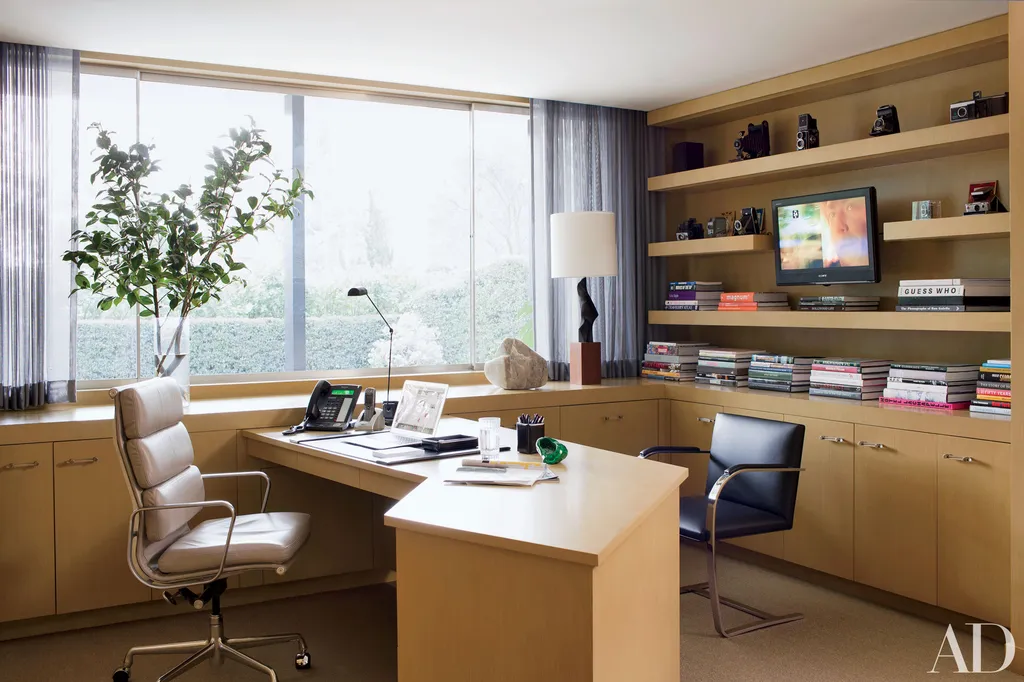
Working from home becomes harder when the workspace was created from leftover furniture and an unused corner. Strong home office setup decisions support concentration, comfort, storage, privacy, and the type of work you complete each day.
A professional workspace does not need a separate room. Many American homes rely on a bedroom corner, dining area, basement section, or converted closet. The goal is to give work a defined location while protecting the rest of the home from cables, papers, equipment, and unfinished tasks.
Begin by reviewing your normal schedule. Video meetings require a different layout from design work, accounting, writing, customer service, or project management. Count the devices you use, study available daylight, and note where household noise appears during working hours.
Professionals comparing furniture assembly, electrical support, or household service categories may find planning ideas through regional home improvement listings. Local providers should still be checked for experience and work suited to the property.
A useful office should make starting easier in the morning and shutting down simpler at the end of the day.
Home Office Setup Built Around Daily Work
A workspace should match the tasks performed most often. Copying a stylish office without considering routine can create an attractive room that feels uncomfortable after several hours.
Position The Desk According To Work Needs
Desk placement affects light, background appearance, movement, and concentration.
Facing a window may provide a pleasant view, but direct sunlight can create screen glare. Placing the desk perpendicular to the window often brings daylight from the side while keeping the screen easier to see.
Video meetings need a calm background. A wall, bookcase, curtain, or simple storage unit may provide better visual order than an open doorway.
Keep enough space behind the chair for movement. A desk pressed into a narrow corner may become frustrating when drawers cannot open or cables collect around the feet.
A professional using two monitors may need a deeper desk than someone working mainly from a laptop. Measure equipment before buying furniture.
The less obvious lesson is that the largest desk is not always the best choice. A smaller surface with clear storage may reduce clutter and keep priority work visible.
Separate Work From Household Traffic
Choose an area that avoids the busiest routes when possible.
A desk beside the kitchen may provide space, yet noise and movement can interrupt meetings and focused tasks. A quieter bedroom corner may work better when the layout supports separation.
Use furniture placement to create a boundary. A bookcase, curtain, rug, or console can define the work zone without building walls.
Keep household items out of office storage. Mixing school papers, mail, tools, and work documents makes both systems harder to manage.
Professionals exploring local furniture, organization, or property support may browse household service categories while comparing nearby options.
The office boundary should remain easy to understand. When work expands across several rooms, shutting down becomes harder.
Improve Comfort For Long Working Hours
Comfort should support steady work without encouraging poor posture or unnecessary movement. Furniture needs to fit the user rather than follow one standard arrangement.
Choose A Chair And Desk That Work Together
Seat height, desk height, screen position, and keyboard placement affect the full workstation.
A chair should support a comfortable sitting position while allowing feet to rest securely. A foot support may help when the desk cannot be adjusted.
Keep the keyboard and mouse close enough that shoulders remain relaxed.
Screens should sit where the user can read them without repeatedly bending the neck. Laptop users may benefit from a separate keyboard and pointing device when the computer is raised.
A polished chair does not guarantee comfort. Test seat depth, back support, arm position, and adjustment range.
The counterintuitive point is that frequent movement may matter more than finding one perfect sitting position. A strong workstation allows changes throughout the day.
Add Lighting For Screens And Paperwork
General room lighting may leave the desk too dark.
Use focused light for reading, writing, and detailed tasks. Position it to reduce glare on screens.
Daylight can improve the room, but blinds or curtains may be needed during strong sun.
Keep bulb appearance connected with the rest of the workspace. Uneven lighting can make long sessions tiring.
A regional electrical and household directory may help professionals identify local categories connected with lighting, wiring, furniture, or property work.
The strongest lighting plan supports both daytime and evening work. One setting may not suit every hour.
Control Cables, Papers, And Equipment
Visual clutter can make work feel unfinished before the day begins. Storage should keep active materials accessible while moving occasional supplies away from the desk.
Give Every Cable A Clear Route
List the equipment connected to power and data.
Place the desk near suitable outlets when possible. Avoid creating long cable paths across walking areas.
Use clips, trays, sleeves, or channels to keep cords grouped and supported.
Label similar chargers so equipment remains easy to identify.
Leave enough slack for normal movement without allowing cables to collect on the floor.
A standing desk needs cable planning through its full range of motion. Test movement before final placement.
The unexpected benefit of cable control is easier cleaning. A clear floor reduces dust buildup and protects equipment.
Store Papers According To Action
Separate active work from records and supplies.
Keep current projects within reach. Move completed documents to closed storage or another suitable location.
Use broad categories rather than many small folders.
A small tray can hold items requiring action. Empty it on a regular schedule so it does not become permanent storage.
Professionals researching local organization, furniture, or office support may review regional business and household listings before checking nearby providers.
Do not keep every document on the desk because it may be needed later. Visibility should reflect priority.
Support Focus And A Clear End To The Day
A home office works better when it helps the mind recognize when work begins and ends.
Reduce Avoidable Interruptions
Keep frequently used supplies near the desk.
Use headphones, curtains, soft furnishings, or door placement to reduce distracting sound where suitable.
Set household expectations around meetings and focus periods.
Place personal devices where they do not compete for attention.
Keep only current work visible.
A simple background can improve concentration because fewer objects compete for attention.
The less obvious improvement may be moving the office farther from household storage. Repeated trips through the work area can interrupt concentration even when nobody speaks.
Create A Shutdown Routine
Close documents, clear the desk, return supplies, and review the next day’s first task.
Turn off equipment that does not need to remain active.
Move cups and household items out of the office.
Use a cabinet, screen, or closed laptop to create a visible end to work.
A short shutdown routine protects the rest of the evening. It also makes the next morning easier because the workspace begins in order.
Conclusion
A professional workspace should support concentration without taking over the home. Desk placement, lighting, comfort, storage, and clear boundaries matter more than decorative trends.
A practical home office setup begins with the work you perform each day. Position furniture around equipment, meetings, daylight, and household movement rather than copying a layout designed for another routine.
Keep cables controlled, active papers visible, and occasional supplies away from the main work surface. Build small movement breaks into the day and create a clear shutdown routine.
The strongest office feels easy to enter, comfortable to use, and simple to leave behind when work ends.
Frequently Asked Questions
Where should a home office desk be placed?
Choose a position with useful daylight, limited glare, clear movement, suitable outlets, and a calm background for meetings.
Can a bedroom include a professional workspace?
Yes. Use furniture, rugs, curtains, or storage to create a clear boundary and keep work materials contained.
How large should a home office desk be?
Size depends on monitors, equipment, paperwork, and available space. Measure the complete workstation before buying.
What lighting works best for remote work?
Combine daylight, general room lighting, and focused desk light. Position fixtures to reduce shadows and screen glare.
How can home office cables be hidden?
Use trays, clips, sleeves, channels, and furniture placement. Keep cables away from walking paths and allow safe movement.
Is a standing desk necessary for working from home?
No. It may help some users change position, but regular movement can also be supported with a suitable seated workstation.
How can a home office feel separate from family space?
Use a defined location, clear storage, visual boundaries, household expectations, and a regular shutdown routine.
What should remain on a professional desk?
Keep current equipment, active work, useful lighting, and a limited number of daily supplies. Move occasional items elsewhere.